
Understand the carbon impact of the electricity you use to charge your electric vehicle.
While your EV may not rely on fossil fuels at the gas pump, you’re still likely contributing to CO₂ emissions when you charge.
Find your report

- Download or open the TezLab app
- Scroll down on the home page to “Recently Tracked” and select “Charges”
- Click on a recent charge report and scroll to “Carbon Impact”
Find details of recent charges
CO₂ is often released during the electricity production process, which allows you to charge your vehicle.
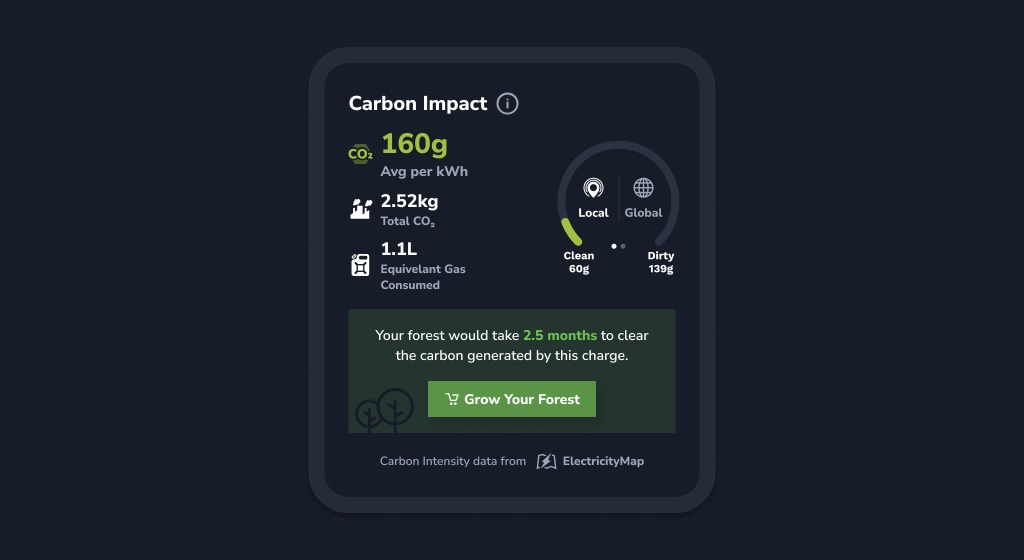
Once you’re in your charge report, check out your carbon impact stats. The lower your numbers are for these three metrics, the better your carbon impact score.
Average CO₂/kWh
The average amount of CO₂ produced per kWh of electricity for the full charge
Total CO₂
The total amount of CO₂ produced for the entire charge
Equiv. Fuel Volume
How much fuel you would need to burn to release the same CO₂ produced for the charge

The “local” and “global” ranges on the right-hand side of the screen show the lowest and highest observed carbon intensities in the month prior to the charge.
Want to offset your carbon emissions?
Grow your forest by planting real trees directly from the app!
To minimize your emissions, you can also charge at the right time for your area and work toward maximizing your charge efficiency.
Explore more
To learn more about your Power Mix Report, check out our post on what energy source is charging your Tesla.
Happy driving, and stay tuned for more on sustainability reports!
Download TezLab here, and subscribe to TezLab Pro for full access to features.
 Tezlab Blog
Leave a comment