
Charging at home is convenient, but a poor charge efficiency can lead to both extra money spent on bills and lost time.
Learn how to view your charge efficiency and which type of charger you should get for your Tesla at home.
Improving your charge efficiency helps lower your electric bill, decrease your carbon footprint, and increase range.
Access your charge report
- Open the TezLab app
- Scroll down the home screen to Recently Tracked charges
- Click into your most recent charge report
Pro tip: to see all of your charges, click into the charging tab in the footer and filter by “charges only.”
At the top of your charge report, you’ll see when you plugged in, where you were charging, and how long it lasted.
Analyze your charge efficiency
Your charge efficiency is calculated using two measurements:
1. Energy Drawn
How much energy is drawn by your charger, or what you’ll see on your utility bill.
2. Energy Added
What the battery actually received.
A charge efficiency over 95% is excellent.
Factors such as weather can affect your efficiency score – for example, if it’s cold, then your score may be lower than usual.
The length of cable, ambient temperature, and what the car is doing at that time also play a significant role in charging.
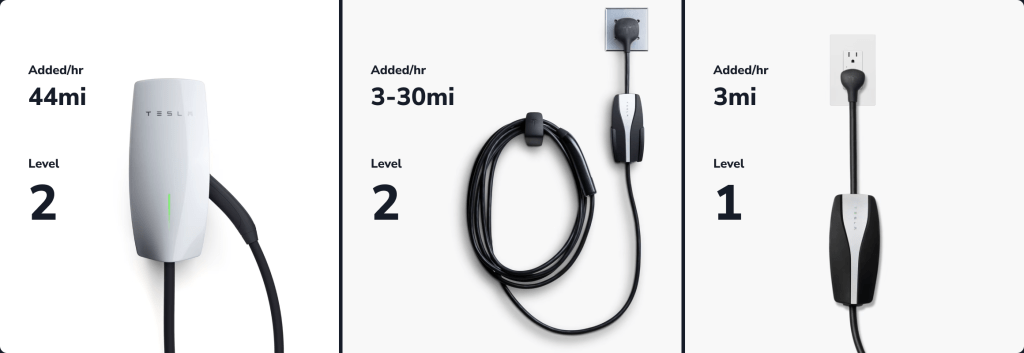
Want to improve your charge efficiency? You may want to try a different type of home charger.
Home chargers, ranked by efficiency

While Tesla superchargers are usually most efficient, you can also achieve excellent efficiency with at-home chargers.
- 🥇 1st place: Tesla brand wall chargers
- 🥈 2nd place: home chargers plugged into appliance outlets
- (ex. 220V dryer plug, 30 AMP RV adapter)
- 🥉 3rd place: home chargers plugged into 3 pin outlets
If the Tesla charger is too expensive, or if you live in a shared apartment building or are renting, then a home charger plugged into an appliance outlet is probably your best bet.
Talk to an electrician to get help setting up your charging infrastructure.
Where your power comes from
In TezLab’s charge report, you can also get granular data on where your power comes from based on your grid location.
In the next post, we’ll go deeper on your charge report data, including your carbon impact, energy source report, and range & power map.
In the meantime, check out your charge efficiency in the app.
 Tezlab Blog
Leave a comment